
FixQuotes
WordPress Plugin
Add a beautiful Quote of the Day widget to your WordPress site. Inspire your visitors with daily wisdom from history's greatest minds — automatically refreshed every day.
Free forever • No account required • Auto-updates daily • Gutenberg ready
Automatic Daily Refresh
Quotes update automatically at midnight. No maintenance required — just install, activate, and let it run. Your visitors see fresh wisdom every day.
Multiple Display Modes
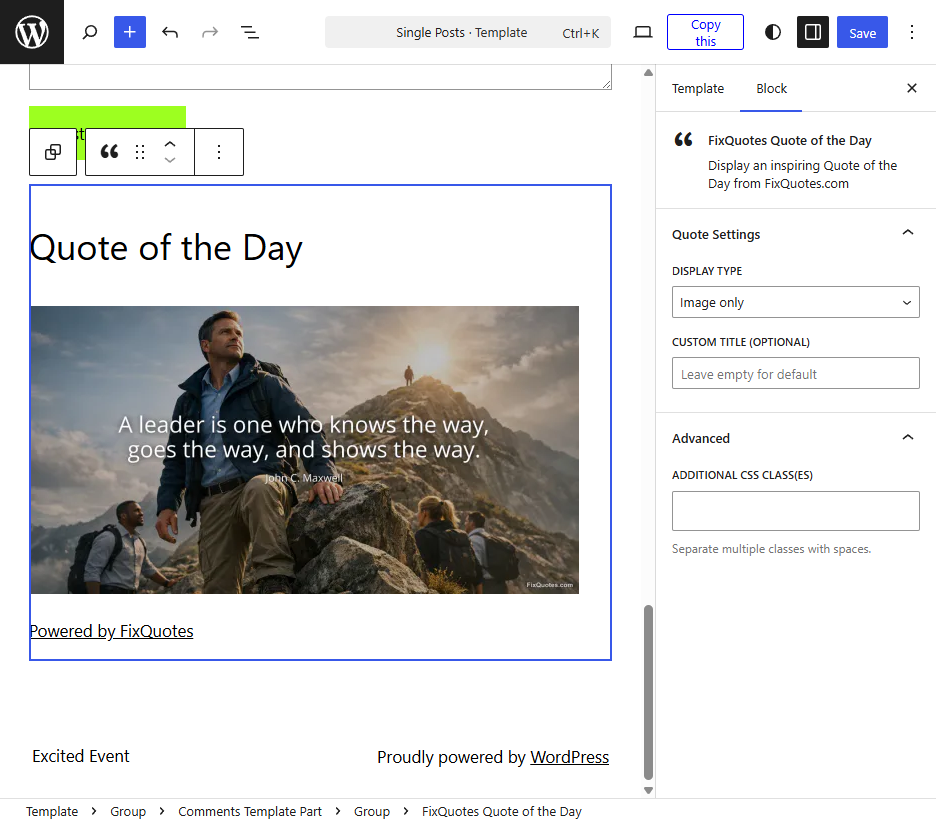
Choose between text-only, image-only, or text + image display. The widget adapts to your theme's styling for a seamless look.
Handpicked Quality
Every quote is personally selected by FixQuotes editors. No random algorithms — just thoughtfully curated wisdom delivered fresh each day.
Gutenberg Block
Native block editor support for WordPress 5.0+. Add quotes anywhere in your posts and pages with a dedicated Gutenberg block.
Shortcode Support
Use [fixquotes_qotd] anywhere in your posts, pages, or theme files. Customize with type and title attributes.
Smart Caching
Quotes are cached locally for fast page loads. No slow external requests on every page view — your site stays lightning fast.
Installation
Install from WordPress
- In WordPress, go to Plugins → Add New
- Search for "FixQuotes"
- Click Install Now then Activate
- Go to Appearance → Widgets
- Drag FixQuotes Widget to your sidebar
Manual Installation
- Download the plugin ZIP file
- In WordPress, go to Plugins → Add New → Upload Plugin
- Choose the file and click Install Now
- Click Activate to enable the plugin
Using Shortcodes
After installation, you can embed quotes anywhere using shortcodes:
[fixquotes_qotd]
Basic text quote
[fixquotes_qotd type="image"]
Image only with custom title
[fixquotes_qotd type="text_image" title="Daily Wisdom"]
Text + image with custom title
Display Modes
| Mode | Description | Shortcode |
|---|---|---|
| Text Only | Clean quote text with author name and link. Lightweight and fast-loading. | type="text" |
| Image Only | Beautiful 1200×628px quote image with typography overlay. Great for visual impact. | type="image" |
| Text + Image | Both text and image for maximum impact. Best for larger widget areas. | type="text_image" |
By the Numbers
FixQuotes features over 170,000 verified quotes from more than 12,000 notable people throughout history. Every quote is checked for accuracy and proper attribution. Your visitors get real wisdom, not misattributed internet memes.
Frequently Asked Questions
Styling & Customization
The plugin uses minimal CSS so quotes inherit your theme's typography and colors. For custom styling, target these CSS classes in your theme's stylesheet or the WordPress Customizer:
| CSS Class | Description |
|---|---|
.fixquotes-qotd-widget |
Main container for all widget content |
.fixquotes-blockquote |
The blockquote element wrapping text quotes |
.fixquotes-quote-text |
The actual quote text paragraph |
.fixquotes-quote-footer |
Author name and profession container |
.fixquotes-profession |
The author's profession (e.g., "Philosopher") |
.fixquotes-quote-img |
Quote image element |
.fixquotes-image-link |
Link wrapper around images |
.fixquotes-more-link |
"Powered by FixQuotes" attribution link |
Example Custom Styles
Add this CSS to your theme's Additional CSS section (Appearance → Customize → Additional CSS):
/* Italic quote text with larger font */
.fixquotes-quote-text {
    font-style: italic;
    font-size: 1.1em;
    line-height: 1.6;
}

/* Style the author name */
.fixquotes-quote-footer a {
    font-weight: bold;
    text-decoration: none;
}

/* Add decorative quote marks */
.fixquotes-blockquote::before {
    content: "\201C";
    font-size: 3em;
    color: #ccc;
    line-height: 0;
    vertical-align: -0.4em;
    margin-right: 0.1em;
}

/* Rounded corners on images */
.fixquotes-quote-img {
    border-radius: 8px;
}
Troubleshooting
Images not loading
Clear your site's cache (if using a caching plugin) and check that your server allows outbound HTTPS connections to fixquotes.com.
Quote not updating
Quotes are cached for 1 hour. Clear your caching plugin or wait for the cache to expire. To force refresh, resave the widget settings.
Block not appearing in Gutenberg
Search for "FixQuotes" in the block inserter. If not found, deactivate and reactivate the plugin, then clear your browser cache.
Widget looks unstyled
The plugin intentionally uses minimal CSS to inherit your theme's styles. Add custom CSS (see Styling section above) for additional formatting.
Error: "Unable to load quote"
Your server may be blocking external API requests. Check with your host that wp_remote_get() to HTTPS URLs is allowed.
Need more help?
Contact us with your WordPress version, theme name, and a description of the issue.
Technical Requirements
- WordPress 5.0 or higher
- PHP 7.4 or higher
- Outbound HTTPS connections
- Works with any theme
- Classic Editor & Gutenberg
- Multisite compatible